The complaint came in during the first discovery call with a new client.
“We’re doing everything right, but traffic isn’t converting the way it should. And half our best-selling products are stuck on page two of Google.”
The brand was a mid-sized e-commerce operation. Clean site. Solid product photography. A backlink profile that was, by most measures, respectable. Their SEO team had run the standard playbook. Their sales team was frustrated with the gap between traffic numbers and revenue.
Nothing obvious was broken. Which usually means something non-obvious is.
What we found next took about 20 minutes to diagnose and roughly 60 days to fully validate. The conversion rate improvement that followed was 19%. One HTML attribute. Thousands of corrections. No new content. No ad spend.
Here is what happened.
The Problem That Hides in Plain Sight
E-commerce sites accumulate complexity over time. This one had several hundred SKUs across categories, with products that cycled in and out of stock, seasonal variants running under different URLs, and campaign-specific landing pages that duplicated existing product content.
From a user perspective, none of that is inherently problematic.
From a search engine’s perspective, it creates a fragmented, contradictory site architecture. Google is trying to determine which version of a page to rank. When the signals conflict, it guesses. And when it guesses wrong, your best product pages lose ranking equity to pages that cannot convert anyone.
That was the situation here. The mechanism was a misconfigured canonical tag.
What the Canonical Tag Is Actually Doing
The <link rel="canonical"> tag tells search engines which URL is the authoritative version of a piece of content. Point it correctly, and all link equity consolidates on the page you want to rank. Misconfigure it, and that equity fractures across multiple URLs.
In plain terms, Canonical tags exist because websites are messy. A single product might be accessible via multiple URLs simultaneously.
- The base product URL:
/products/aeroglide-water-bottle-32oz-blue - A size or variant parameter:
/products/aeroglide-water-bottle-32oz-blue?size=32oz - A campaign URL:
/summer-sale/aeroglide-water-bottle-32oz-blue - A session ID or tracking parameter:
/products/aeroglide-water-bottle-32oz-blue?source=facebook
Without canonical tags, Google treats each of these as a separate page. It then has to decide which one to rank. The link equity those pages collectively earn gets diluted across all of them rather than concentrating on one.
The canonical tag is the fix. It says, definitively, which URL is the main version. Everything else defers to it.
When it works correctly, it is invisible and effective. When it is misconfigured, it systematically destroys the ranking potential of your most commercially valuable pages.
The Diagnosis: What We Actually Found
We ran a full site crawl using Screaming Frog and cross-referenced the findings against Google Search Console data. The picture that emerged was consistent and damaging.
The healthy product page looked fine. The in-stock AeroGlide Water Bottle page had its canonical tag pointing correctly to itself. No problem there.
The out-of-stock pages were the culprit. When a product sold out, the site’s system automatically generated an out-of-stock page at a separate URL. These pages stayed live, which is often a reasonable decision. Returning customers may want to check back. The pages may carry reviews or content worth preserving.
The error was in the canonical configuration. Instead of the OOS page pointing its canonical back to the main product page, someone or some automated system had set it to point to itself.
The out-of-stock URL was declaring itself the canonical version. Meanwhile, the actual in-stock product page was making the same declaration. Google now had two competing pages, each insisting it was the authoritative version of the same product.
What that conflict produced:
- Google was uncertain which page to index for product-intent searches
- External links pointing to OOS pages were passing equity to pages that cannot convert
- Internal links were further splitting authority rather than consolidating it
- The OOS page was occasionally outranking the in-stock product page for “buy” queries
That last point is worth pausing on. Real customers searching for a product they wanted to purchase were landing on a page that told them it was unavailable. The conversion path was broken at the point of highest intent.
This was not isolated to one or two products. When we exported the full list and filtered for URLs containing paths like /out-of-stock/, /discontinued/, and /unavailable/, we found the same misconfiguration repeated across the entire catalog.
Why This Kills Conversions Specifically
Most canonical tag discussions focus on rankings. The conversion impact is less often discussed, and it is just as significant.
Consider the path a qualified buyer takes.
They search for a specific product. They click a result. If that result lands them on a page with an “Out of Stock” message, the session is functionally over. The bounce rate on those pages was high. The conversion rate was effectively zero.
Now consider that Google, having indexed the OOS page as the canonical version for that product query, was actively routing high-intent traffic to a dead end.
Every customer who clicked that result had already decided they wanted the product. The site’s own technical configuration was intercepting them before they could buy.
This is what technical SEO debt costs in revenue terms. Not rankings in isolation. Actual transactions that should have happened and did not.
The Fix: One Attribute Change, Applied at Scale
The solution was straightforward. For every misconfigured OOS, discontinued, or unavailable page, the canonical tag needed to point to the corresponding in-stock product page rather than to itself.
Before: <link rel="canonical" href="https://sarahsstore.com/out-of-stock/aeroglide-water-bottle-32oz-blue" />
After: <link rel="canonical" href="https://sarahsstore.com/products/aeroglide-water-bottle-32oz-blue" />
Simple in principle. The execution required structured thinking at scale.
Template-level fix first.
The OOS pages were generated from a shared template. Updating the canonical logic in that template automatically corrected every new OOS page going forward. The tag now dynamically referenced the corresponding /products/ URL.
Bulk correction for historical pages.
Thousands of historical OOS pages needed individual correction. We exported the full list of broken URLs with their correct canonical targets and passed that to the development team as a structured data set.
Scripted deployment.
Developers applied a script to update canonical tags across all historical OOS pages in a single deployment. No manual page-by-page editing.
Verification crawl.
After deployment, we re-crawled a significant sample of OOS pages and confirmed that the canonical tags were pointing correctly. We also monitored Google Search Console for any new canonical-related crawl errors in the days following.
The total development time was modest. The discovery and diagnosis took longer than the fix itself.
What Happened in the 60 Days After
We expected a gradual improvement. The pace of the change was faster than anticipated.
Weeks 1 to 2:
Google Search Console showed the OOS URLs being de-indexed. Impressions for queries containing “out of stock” and “unavailable” dropped. This was the correct signal. Those pages should not be ranking for purchase-intent queries.
Weeks 3 to 4:
The product pages that had been competing with their own OOS variants started climbing. The in-stock AeroGlide page, which had been stuck behind its OOS counterpart for core “buy” queries, moved to the positions that those queries warranted.
Traffic behavior shifted.
Organic visitors were landing on pages built for conversion: product images, reviews, pricing, and an add-to-cart button. Bounce rates on the product pages dropped sharply. The traffic had not changed in volume meaningfully, but where it was landing had changed entirely.
The conversion rate improvement: Over the 60 days following the fix, compared to the 60 days prior, overall website conversion rate increased by 19%.
No redesign. No price reduction. No new ad budget. No content overhaul.
One attribute in one HTML tag, corrected systematically across a catalog. That was the entire intervention.
The Broader Lesson for E-Commerce SEO
This case is instructive beyond the specific canonical tag issue.
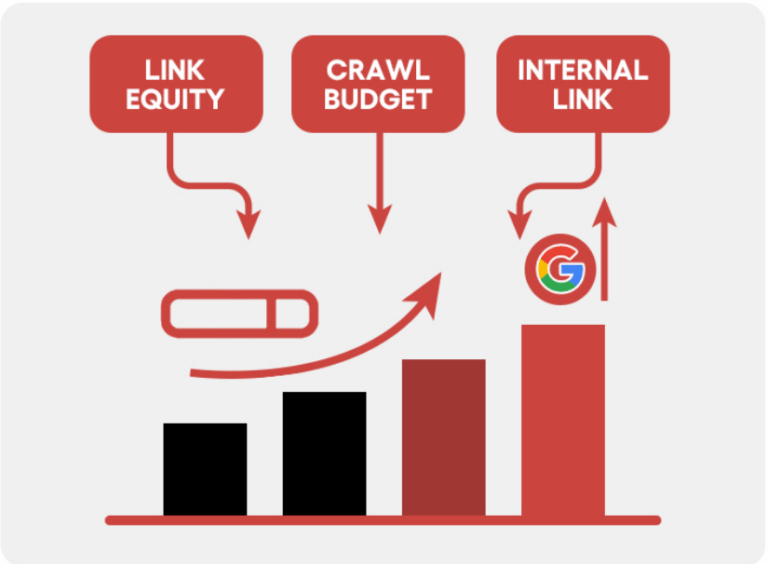
The brand had invested in content, backlinks, and on-page optimization. None of that investment was reaching its potential because a technical misconfiguration was redistributing equity away from pages that could generate revenue.
Technical SEO is not a separate track from conversion optimization. They are the same thing. A configuration error that sends a qualified buyer to a dead end is simultaneously an SEO failure and a revenue failure.
Canonical tag issues are not unique to OOS pages. The same problem appears in other contexts:
- Paginated content where /page/2/ points to itself instead of the root URL
- Filtered category pages like
/shoes?color=redpointing to themselves instead of/shoes/ - HTTP and HTTPS inconsistencies where both versions self-reference
- WWW and non-WWW variants both claiming canonical status
- Session ID parameters creating unique URLs that dilute equity from the main page
Anywhere near-duplicate content exists, a misconfigured canonical can fracture your SEO authority and route users to the wrong destination.
The diagnostic process is not complicated:
- Crawl your site and extract every canonical tag
- Export all URLs with their declared canonical targets
- Filter for pages where the canonical points to the same URL as the page itself, and that URL is a non-purchasable or low-value page
- Trace canonical chains to find cases where equity is getting stuck at intermediate pages rather than flowing to the canonical destination
- Cross-reference with Google Search Console to identify which OOS or discontinued pages are currently indexed for commercial queries
Most sites with more than a few hundred SKUs will find something in that process. The question is whether the equity leak is large enough to account for a meaningful gap between traffic and revenue.
In this case, it was.
A Quick Self-Audit You Can Run Right Now
Open any out-of-stock or discontinued product page on your site. Right-click, view page source, and search for rel="canonical". Look at the URL in that tag.
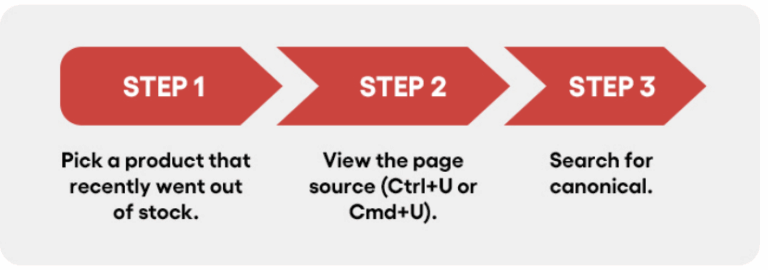
Does it point to the active, in-stock product page? Or does it point to the OOS URL itself?
If it points to itself, you have the same configuration error this client had. The scale of the revenue impact depends on how many products are affected and how much link equity those pages have accumulated.
Want to Find Out If Your Conversion Rates Match Traffic?
If your organic traffic looks reasonable but conversion rates are not reflecting it, a technical audit often reveals where the disconnect is. Request a site teardown and find out whether a configuration issue is quietly working against your revenue targets.